Set up the Data Dictionary
To install the RareLink-CDM instruments, you will need to download the instruments from here and follow the steps below. Make sure your REDCap project is set up and running, otherwise follow the Set up a REDCap Project section to set up a REDCap project. Read the RareLink-CDM section to learn more about the RareLink CDM Instruments. In case you have any questions, please contact your local REDCap administrator, or Contact us.
Installation
Download the instruments from the RareLink REDCap project.
Upload the data dictionary to your REDCap project
To upload your data dictionary to your REDCap project automatically, type:
rarelink setup data-dictionary
Otherwise you can also import the instruments manually:
Go to your REDCap project.
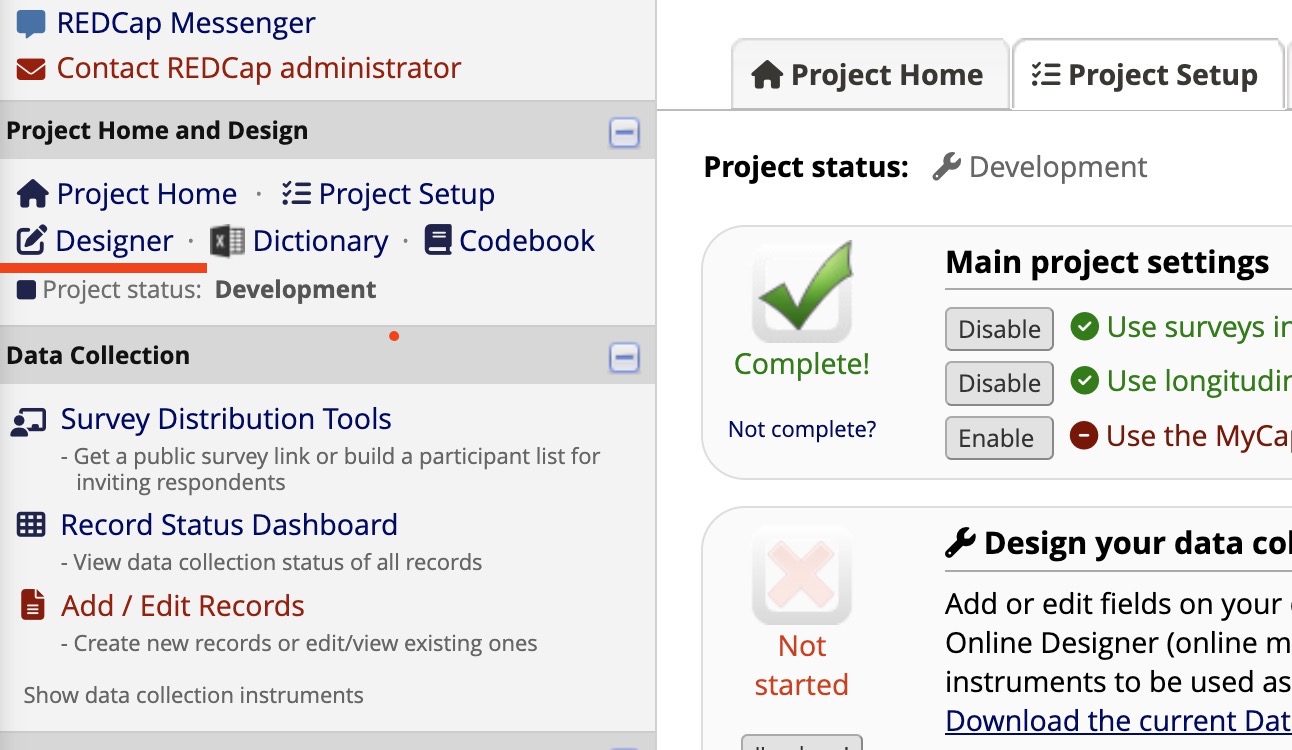
Click on the “Designer” tab on the left side of the screen.
Click on the “Data Dictionary” tab on the top of the screen.
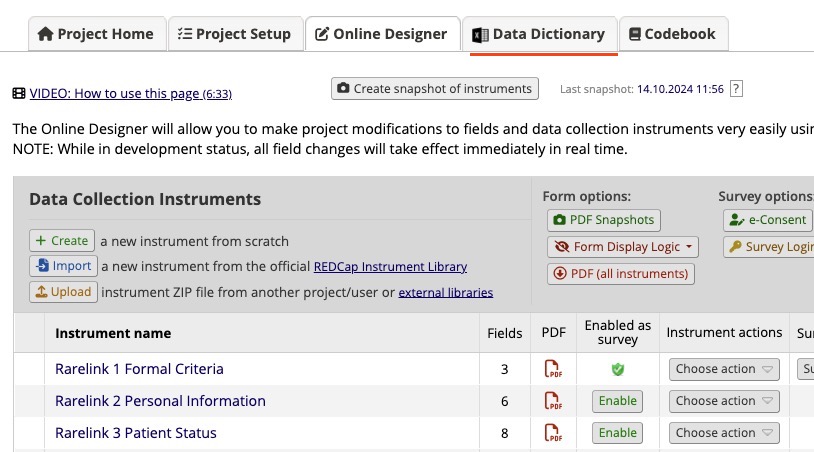
Select the RareLink CDM Data Dictionary CSV file, or the separate instrument csv files.
Click on the “Import” button.
Verify that the instruments have been imported correctly.
Go to the “Online Designer” tab and check the data elements in each instrument.
- check with the RareLink-CDM page to verify that
the instruments have been imported correctly.
the instruments are consistent with the RareLink CDM Data Dictionary.
the fields with BioPortal are connected properly.
Activate the repeating instruments feature
Go to the
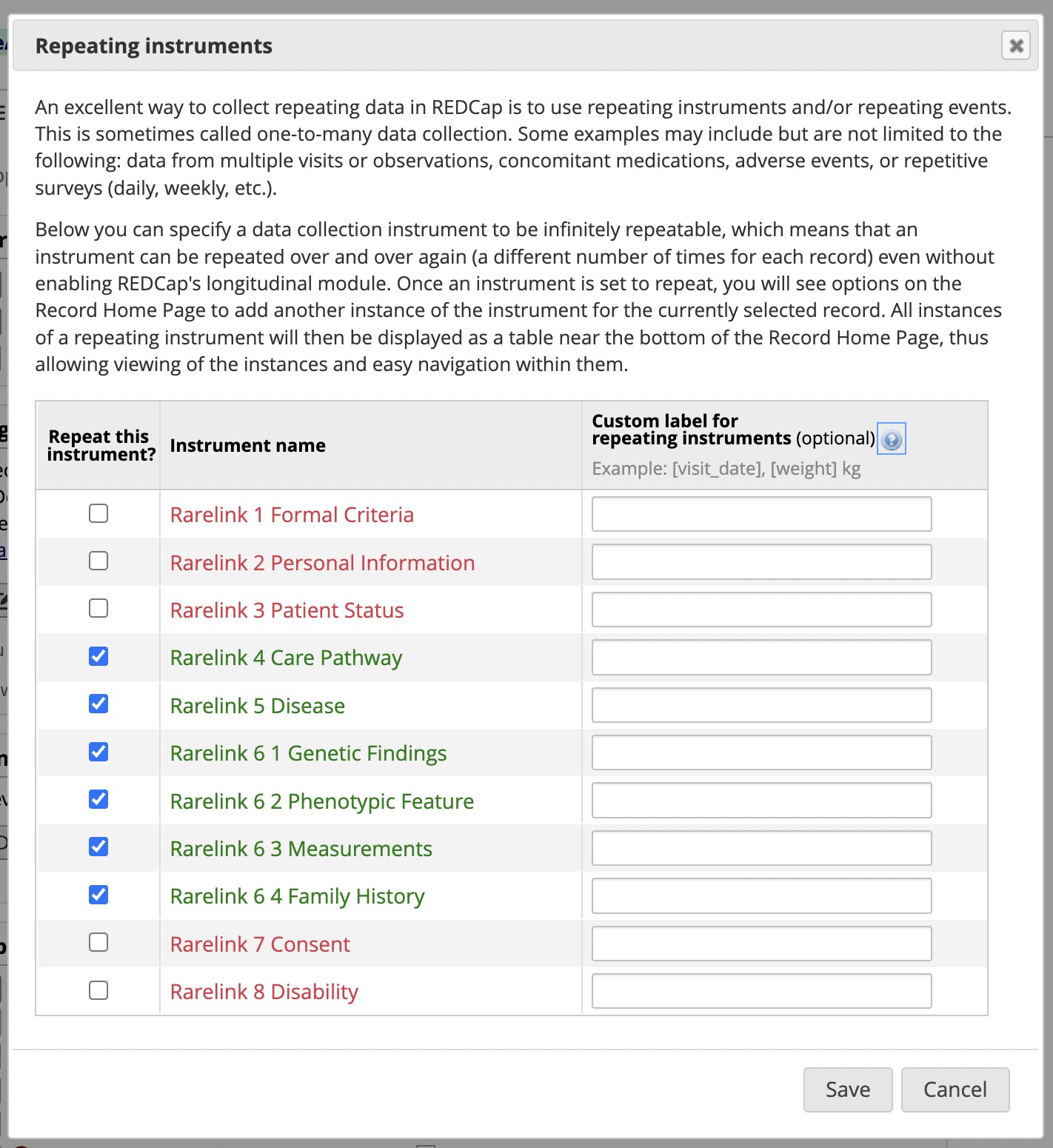
Project Setuptab.Within the section Enable optional modules and customizations click on the `Enable` Repeating Instruments checkbox.
Enable repeating instruments for the following instruments:
Start capturing data with the RareLink CDM instruments.
Check out the Manual Data Capture or the Semi-Automatic Import section to learn more about the semi-automatic import of data.
Continue here…
Manual Data Capture section to learn on how to use the RareLink CDM instruments.
Semi-Automatic Import section to learn on how to import data from tabular databases.
Phenopackets Module section to learn on how to export data to Phenopackets.
Phenopackets Module section to learn on how to export data to FHIR.
Further reading…
Read pages 25 & 26 of the Comprehensive Guide to REDCap for more information.
- Read the REDCap section to learn more about the general REDCap Setup,
among others how to connect BioPortal to REDCap.
Separate RareLink-CDM Instruments
The RareLink-CDM section provides an overview of the RareLink-CDM which is based on the ontology-based rare disease common data model harmonising international registries, FHIR, and Phenopackets (RD-CDM). However, for many use cases, it may be necessary to use only a subset of the instruments.
For such cases, please note:
If you use the RareLink-CDM instruments, you will not need to enter data for all instruments - many of these instruments can be left empty or deleted.
The RareLink-CDM instruments are designed to be used in a modular way, so you can use only the instruments that are relevant to your study.
However, if an instrument is used in your study, it is important to fill in all
mandatorythe fields in that instrument to ensure correct FHIR and Phenopacket export. Please read:Section cdm-instruments-overview
The sheets
(1) Formal Criteriaand(2) Personal Informationmust always be filled in to ensure correct FHIR and Phenopacket export!Feel free to Contact us in case you have any questions or need help.
Extensional RareLink-CDM Instruments
The RareLink-CDM section provides an overview of the RareLink-CDM which is based on the ontology-based rare disease common data model (RD-CDM). However, for many use cases, it is necessary to extend the data model with additional fields or instruments. This can be done by following the established RareLink guidelines given in the Develop REDCap Instruments section. Feel free to Contact us in case you have any questions or need help.
Customise the Data Dictionary
In many cases it may be necessary to customise the RareLink-CDM Data Dictionary to suit your specific needs or simplify manual data capture. To ensure that the FHIR and Phenopacket modules work correctly, it is important to follow the guidelines below.
To customise your RareLink-CDM Data Dictionary, you can…
Hide fields
…add the
@HIDDENactiontag to fields that you do not want to display in the REDCap project. This can be useful for fields that are not required in your specific profect for manual data entry and can therefore be hidden from the user interface. - You can find more information on the@HIDDENaction tag in theNote
Make sure you do not hide fields that are marked as
requiredwithin the REDCap instrument and RareLink-CDM. You can find all the required fields in the RareLink-CDM Instruments subsection of the RareLink-CDM section.
Change labels & descriptions
…change the field labels or field descriptions to better suit your project needs. This can be useful to clarify the meaning of a field or to provide additional information to the user. - You can find more information on how to change field labels and descriptions in the
Important
Do not change the field name or variable: The field variables/names in the RareLink-CDM Data Dictionary are used to map the data to FHIR and Phenopackets. Changing the field names will break the mapping.
Multi-language management
…edit and add the language settings for the RareLink-CDM using the REDCap Multi-language Management feature. This can be useful to provide the RareLink-CDM instruments in multiple languages for your users.
Note
Feel free to Contact in case you are interested in creating official language versions of the RareLink-CDM Instruments or RareLink. We are happy to collaborate with you on this and support you in the process.
Add new fields & instruments
… add new fields and instruments to the RareLink-CDM as extensions: This can be useful to capture additional information that is not included in the RareLink-CDM Data Dictionary. For this please refer to the guidelines in the Develop REDCap Instruments section on how to extend the RareLink-CDM Data Dictionary.
Hint
In case you have questions, please Contact directly or write an issue on GitHub to ensure you make use of the RareLink framework in the best possible way. We are happy to help you with any questions you may have and collaborate on extensions and improvements.